Generate a video from a single sentence? Just a year ago, that sounded unbelievable to ordinary users. OpenClaw, an open-source platform for AI agents, takes it to the next level with its latest version, 2026.4.5 .
What exactly has changed? A built-in video_generate tool has been added. The agent gets access to it automatically as soon as you set the API key for any supported provider. No manual additions to the list of permitted tools, no extra configuration.
Twelve providers and one command
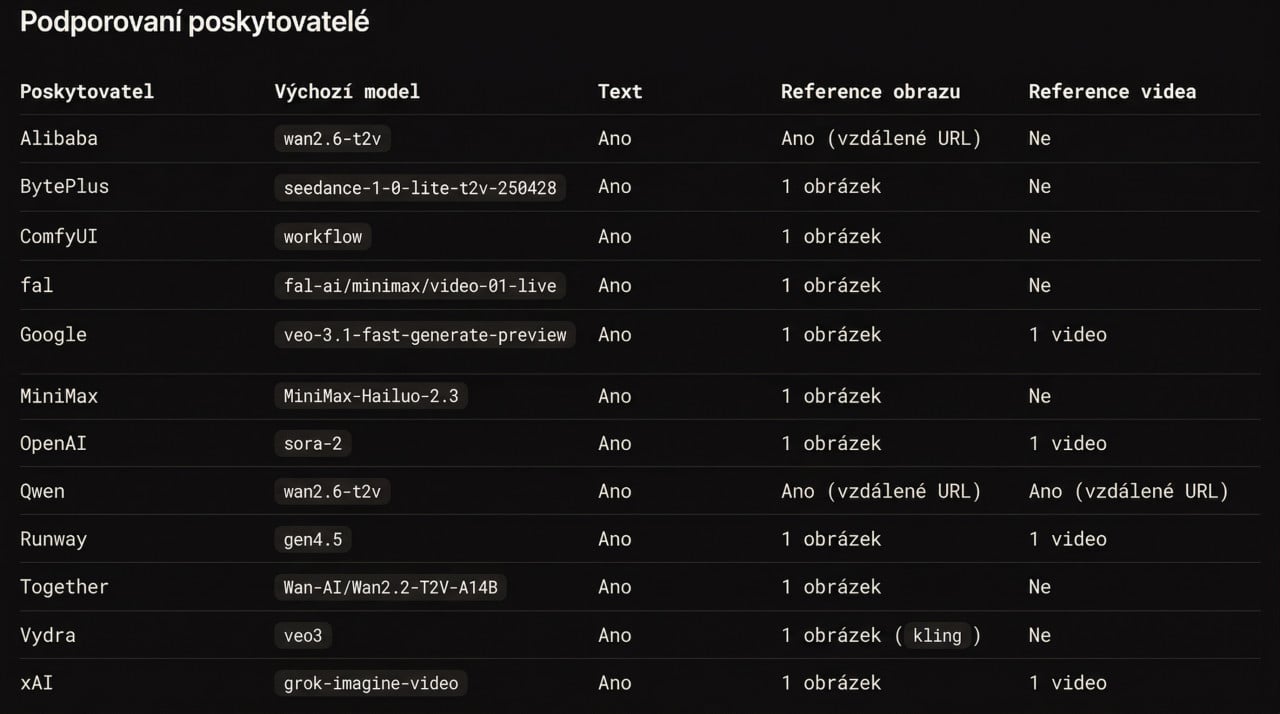
You may be surprised by how many services OpenClaw supports. Google Veo, OpenAI Sora, Runway, MiniMax, xAI, fal, Alibaba, BytePlus, Qwen, Together AI, ComfyUI, and Vydra. All of these providers are integrated into a single unified interface. The agent selects the right one based on the available keys and the configured settings.
The entire selection process follows this order: first the parameter directly in the command, then the primary model from the configuration, then fallbacks, and if none of these are configured, automatic detection begins. Does one provider fail? It switches to the next one without you having to do anything.
If users want to explicitly set the default model, all it takes is one line:openclaw config set agents.defaults.videoGenerationModel.primary "google/veo-3.1-fast-generate-preview"
Three modes for everything
OpenClaw distinguishes between three ways to generate videos, and this distinction is quite important. Text to video (generate) works without any input material. Image to video (imageToVideo) takes a reference photo and animates it. Video to video (videoToVideo) takes existing footage and transforms it.
Each provider supports a different combination of these modes. For example, Runway supports all three, but video-to-video transformation requires the specific gen4_aleph model. Google Veo handles both text and images, but the shared tests skip video transformation because its input format does not yet correspond to the standard shared test. And providers such as MiniMax or fal work only with text or a single reference image. Everyone can choose according to what they currently need.
Video generation is not instantaneous. OpenClaw accounts for this and handles the entire process asynchronously. After submitting a request, you immediately receive a task identifier. The provider processes the video in the background, typically taking 30 seconds to 5 minutes depending on the provider and resolution. Once it is ready, OpenClaw wakes the original session and sends the video back to the conversation.
You can check the task status with the following command: openclaw tasks list openclaw tasks show <taskId>
And if the agent attempts to start generation again in the meantime, OpenClaw stops it and returns only the current status of the task already in progress. No duplicates, no wasted API credits.
More new features in the update
Video generation is undoubtedly the biggest new feature, but release 2026.4.5 brought significantly more. Music generation was added through the music_generate tool, with support for Google Lyria and MiniMax. New language model providers were added: Qwen, Fireworks AI, and StepFun. Dozens of bugs were fixed across platforms: Telegram, Discord, WhatsApp, Matrix, Slack, and MS Teams. Security patches tightened permission management for plugins, device pairing, and browser SSRF protection.
More than a thousand commits since the last release. And over ninety contributors from around the world. This platform is definitely not resting on its laurels.