

Google Introduces Gemini CLI: A Free AI Assistant Directly in Your Terminal
In June 2025, Google officially introduced a new tool for developers - Gemini CLI. This fully open-source AI agent brings the power of Gemini artificial intelligence directly to developers' terminals around the world.
The Terminal as Developers' Home
For developers, the command line (CLI) is not just a tool - it is their home. The terminal's efficiency, ubiquity, and portability make it an indispensable utility for getting work done. As developers continue to rely on the terminal, demand for integrated AI assistance is also growing.
That is why Google is introducing Gemini CLI, an open-source AI agent. It provides lightweight access to Gemini and gives you the most direct path from your prompt to the model. Although it excels at coding, Gemini CLI was designed to do much more.
Unprecedented Usage Limits for Individual Developers
To use Gemini CLI for free, simply sign in with a personal Google account and obtain a free Gemini Code Assist license. This free license gives you access to Gemini 2.5 Pro and its massive 1-million-token context window.
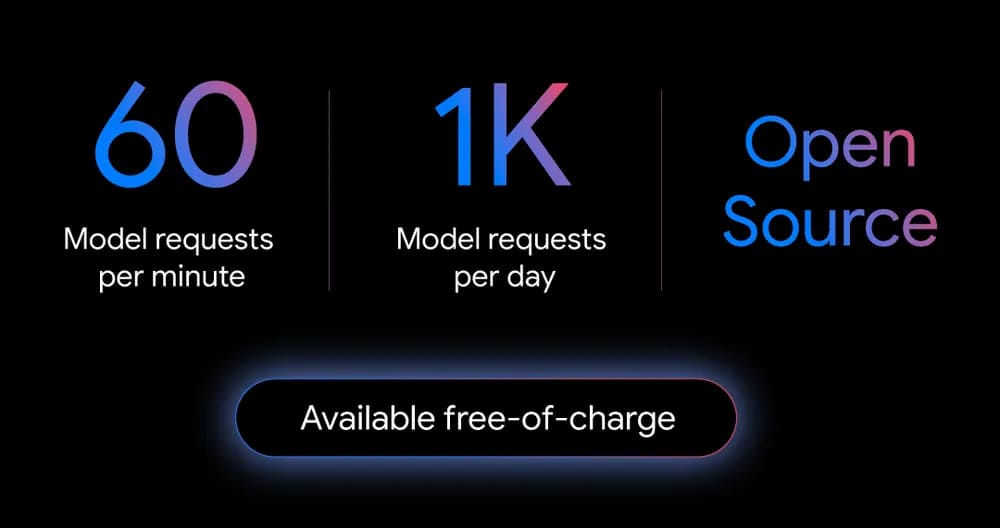
To ensure that you almost never hit a limit during this preview, Google offers the industry's most generous allowance: 60 model requests per minute and 1,000 requests per day for free.
If you are a professional developer who needs to run multiple agents simultaneously, or if you prefer to use specific models, you can use a Google AI Studio or Vertex AI key for usage-based billing, or obtain a Gemini Code Assist Standard or Enterprise license.
Powerful Models on the Command Line
The preview version of Gemini CLI provides powerful AI capabilities, from code understanding and file manipulation to command execution and dynamic problem-solving. It offers a fundamental upgrade to your command-line experience, allowing you to write code, debug issues, and streamline workflows using natural language.
Its power comes from built-in tools that allow you to:
- Ground prompts with Google Search - you can retrieve web pages and provide the model with external, real-time context.
- Extend Gemini CLI's capabilities through built-in support for the Model Context Protocol (MCP) or bundled extensions.
- Customize prompts and instructions to tailor Gemini to your specific needs and workflows.
- Automate tasks and integrate with existing workflows by running Gemini CLI non-interactively within your scripts.
An Open and Extensible System
Because Gemini CLI is fully open source (Apache 2.0), developers can explore the code to understand how it works and assess its security implications. Google fully expects (and welcomes!) the global developer community to contribute to this project by reporting bugs, suggesting features, continuously improving security practices, and submitting code enhancements.
Gemini CLI was also designed to be extensible, building on emerging standards such as MCP, system prompts (via GEMINI.md), and settings for both personal and team configuration.
Shared Technology with Gemini Code Assist
Sometimes an IDE (integrated development environment) is the right tool for the job. At such times, you want all the capabilities of a powerful AI agent by your side so you can iterate quickly, learn, and overcome challenges.
Gemini Code Assist, Google's AI coding assistant for students, hobbyist programmers, and professional developers, now shares the same technology as Gemini CLI. In VS Code, you can enter any prompt into the chat window using agent mode, and Code Assist will work tirelessly on your behalf to write tests, fix bugs, build features, or even migrate your code.
Based on your prompt, the Code Assist agent will create a multi-step plan, automatically recover from failed implementation paths, and recommend solutions you may not have even imagined.
Easy to Get Started
Gemini CLI agent mode is available at no additional cost for all plans (Free, Standard, and Enterprise) through the Insiders channel. If you are not already using Gemini Code Assist, give it a try. Its free tier has the highest usage limit on the market today, and getting started takes less than a minute.
To upgrade your terminal experience with Gemini CLI today, simply install Gemini CLI. All you need is an email address to get virtually unlimited access to Gemini in your terminal.


