What is AI Copilot? A comprehensive guide to Microsoft's latest assistant
Microsoft Copilot is an intelligent assistant based on artificial intelligence that functions as your everyday AI companion. Unlike ordinary assistants such as Siri or Alexa, Copilot represents a more advanced concept of a "second pilot" for both your work and personal tasks. It offers proactive assistance, content generation, and the ability to understand the context of what you are doing.
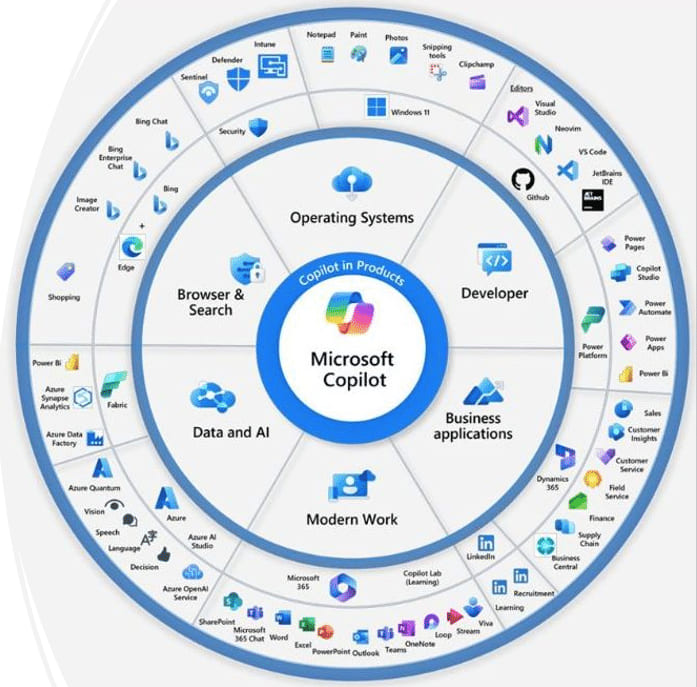
Microsoft Copilot uniquely connects:
The intelligence and context of the web environment
Your work data and documents
Current activity on your device
The result is a seamless environment that assists you directly in the applications where you work, whether it is Windows, Microsoft 365, or the Edge web browser.
When and how did it originate?
Microsoft Copilot has an interesting development history:
- Initial concept originated with GitHub Copilot, which was introduced in June 2021 as a "programmer-assistant" for developers, created in collaboration with OpenAI.
- March 2023 - Microsoft announced the introduction of Microsoft 365 Copilot (originally called Copilot for Microsoft 365), which integrated ChatGPT technology into applications such as Word, Excel, PowerPoint, and Outlook.
- September 2023 - Microsoft officially introduced the unified concept of Microsoft Copilot as a comprehensive AI assistant. The first version began rolling out as part of the free Windows 11 update on September 26, 2023.
- October 2023 - Microsoft 365 Copilot became generally available to business customers from November 1, 2023, together with Microsoft 365 Chat (formerly Business Chat).
- 2024 - Microsoft continues to expand Copilot into additional products and services, including deeper integration into the Windows operating system.
How does it work?
Microsoft Copilot is built on several key technological pillars:
- Large language models (LLMs) - Advanced language models from OpenAI (GPT-4) work behind the scenes of Copilot, enabling natural language understanding and near-human-level text generation.
- Contextual understanding - Copilot stands out through its ability to incorporate several layers of context into its answers and suggestions:
Web content - access to current information online
Your documents - the ability to analyze and work with your files.
Current activity - it monitors what you are currently working on.
- Integration into the system and applications - Instead of being a standalone application, Copilot is integrated directly into the tools you use:
In Windows 11, it is accessible from the taskbar or via the Win+C keyboard shortcut.
In Microsoft 365, it works directly within applications such as Word, Excel, PowerPoint, and Outlook.
In the Edge browser, it works together with the Bing search engine.
- Security features - For business users, the Copilot Enterprise version offers security assurances that company data is not used to train models and remains protected.
Microsoft Copilot was designed as a universal assistant for different types of users:
Everyday users
- It simplifies everyday tasks such as searching for information, planning, and organizing.
- It helps with creative projects (writing, creating presentations).
- It assists with shopping, travel planning, and personal projects.
Professionals and business users
- Content creation - it helps write emails, reports, and presentations faster.
- Data analysis - in Excel, it helps analyze trends and create visualizations.
- Information summarization - it can summarize long documents or email conversations.
- Meeting preparation - in Teams, it helps prepare for meetings and summarize notes.
Creators and developers
- In applications such as Paint and Clipchamp, it helps with creative tasks.
- It can assist developers with writing code and documentation.
- It helps edit and enhance photos and videos.
Education sector
- It helps students with research and organizing study materials.
- It assists teachers with lesson preparation and assessment.
Conclusion
Microsoft Copilot represents a significant milestone in the development of artificial intelligence for everyday use. It unifies previously fragmented AI features into one coherent experience that is available across devices and applications. Although this technology is still in its early stages, the pace of its development suggests that in the coming years it will become an indispensable part of our digital lives. Microsoft is investing enormous resources in the further development of Copilot, indicating its strategic importance to the company's future. For users, now is the ideal time to start experimenting with Copilot and discover how this AI companion can transform their productivity, creativity, and digital experiences.