

Aleph by Runway: Edit, Add to, and Generate Your Own Videos
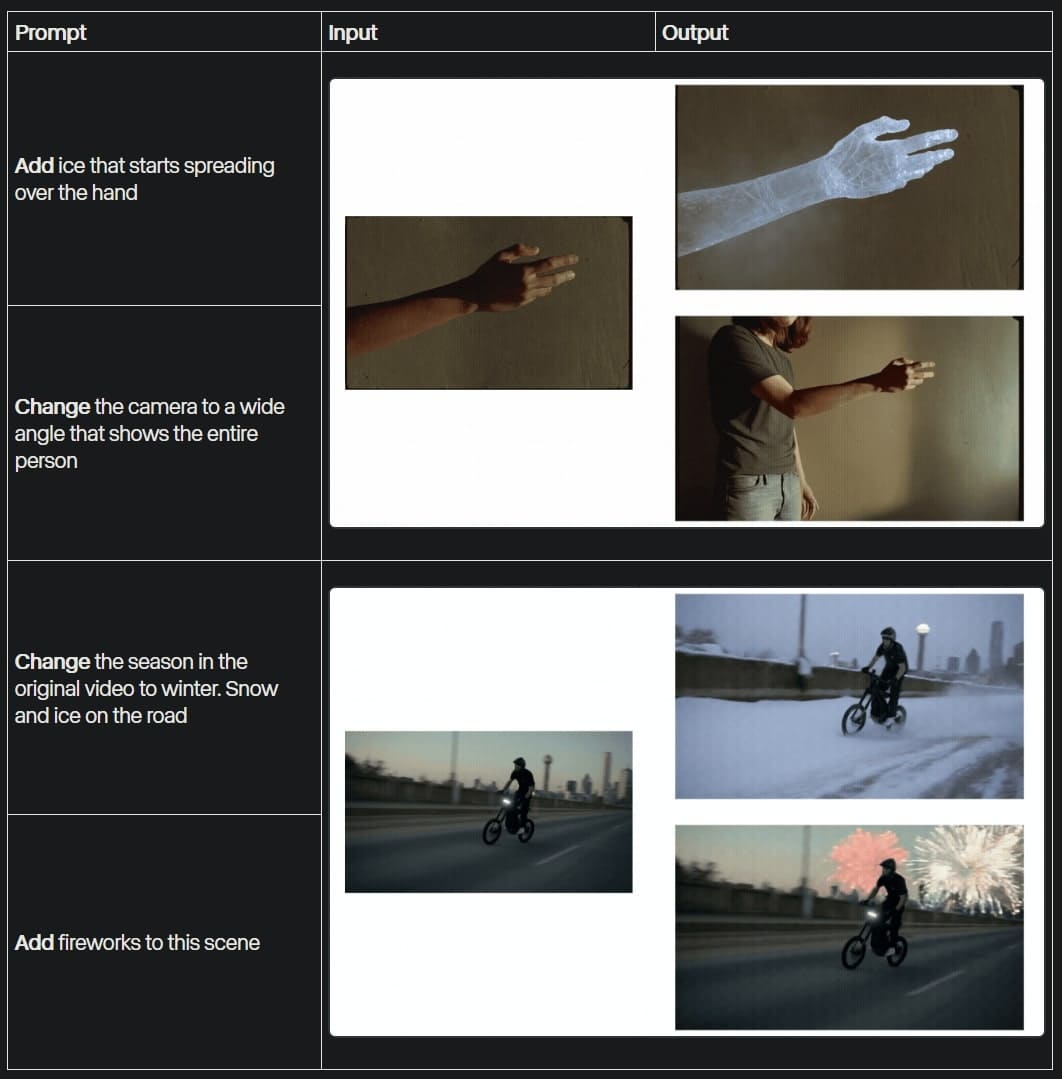
Runway Aleph brings new generative capabilities to the world of video production, allowing you to edit and manipulate existing footage. This tool is available to users on the Standard plan or higher. Aleph opens up a wide range of storytelling applications, such as showing new angles of a scene, modifying specific subjects, objects, or environments in a video, adding visual effects, or changing the lighting. For example, you can add fireworks to a scene or change the season to winter, with snow and ice on the road. These examples are just the beginning, as new uses emerge every day.
Getting Started with Aleph
Aleph is available in Chat Mode or Tool Mode within a generative session. Chat Mode is recommended because it acts as a creative partner, helping you explore ideas and refine your vision through conversation. Tool Mode is suitable for a manual approach when you want precise control over the prompt during iterations. To get started, launch a new session or open an existing one. In Chat Mode, click the Chat Mode button and upload a video to the prompt. In Tool Mode, select the Gen-4 model and upload a video to the prompt canvas.
Before uploading, keep in mind that Aleph only uses the first 5 seconds of a video if it is longer. It automatically crops videos that do not match the supported resolutions. For greater control, we recommend manually trimming longer videos or cropping those with unsupported dimensions. Specifications include a cost of 15 credits per second, a maximum length of 5 seconds, a maximum file size of 64 MB, and output resolutions of 16:9 at 1280x720 pixels, 9:16 at 720x1280 pixels, 1:1 at 960x960 pixels, 4:3 at 1104x832 pixels, 3:4 at 832x1104 pixels, or 21:9 at 1584x672 pixels.
Creating a Prompt
There are no exact rules for creating a prompt, but simplicity is key. An effective prompt contains an action verb describing the scope of the changes and a description of the desired transformation. Examples of action verbs include "add," "remove," "change," "replace," "re-light," or "re-style." For example, the prompt "Add ice that begins to spread across the hand" creates an effect of ice spreading across the hand in the video. Another example is: "Change the camera to a wide-angle shot that shows the entire person" or "Change the season in the video to winter. Snow and ice on the road," which adds winter elements to the scene featuring a bicycle.
If you are using input images, specify how they should interact with the video. For example, "Change the color of the house in the video to the color from the image," "Re-light the video using the lighting from the image," or "Re-style the video in the 3D animation style from the image." Subjects and objects from images may not remain consistent, so it is better to ensure their consistency in the input video. For consistent elements, generate them in References and then animate them with Gen-4.
Generation and Iteration: From Idea to Final Result
After creating the prompt, send the message in Chat Mode or click Generate in Tool Mode. Once generation is complete, you can ask for further prompt adjustments or upscaling to 4K resolution in Chat Mode. This process enables iterative improvements, such as adding fireworks to a scene or changing the lighting. For more examples, see the Aleph Prompting Guide, which provides detailed examples.
Runway Aleph, introduced in the opening video as a new way to edit, transform, and generate video, opens the door to creativity without complex tools. With these steps, you can easily experiment and create stunning results that push the boundaries of traditional video production.


