

Cline vs Cursor: Which AI Code Generation App Is the Better Choice?
In 2025, programmers are increasingly relying on AI code generation tools, with two of the most popular being Cline and Cursor. Both applications offer advanced features for automating coding, but they target different types of users and projects. Let's compare them in detail based on real user experiences.
Cline: A Tool for Advanced Programmers
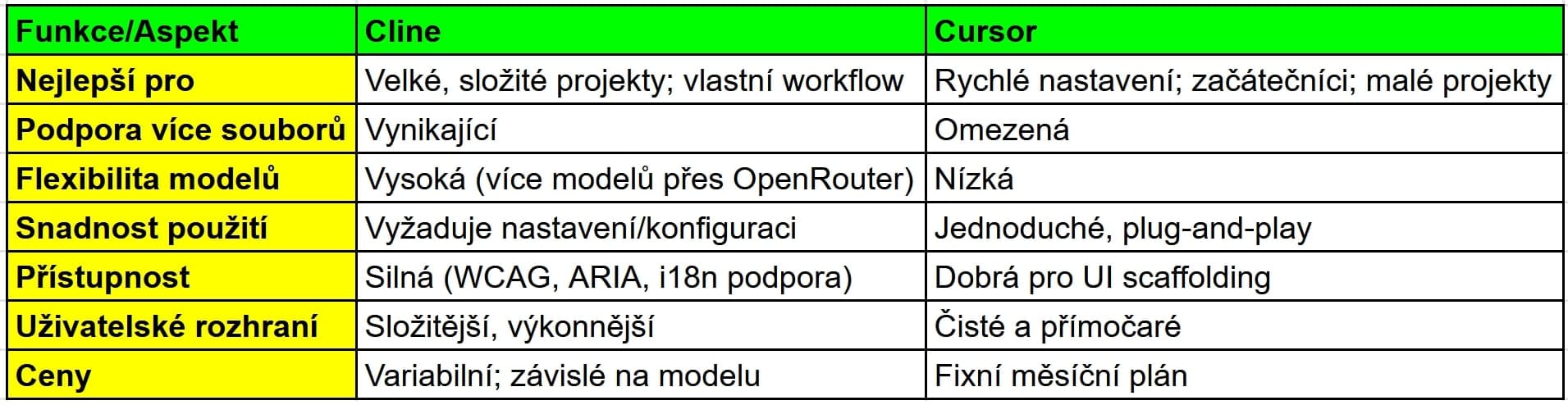
Cline is designed primarily for advanced developers and complex projects. It excels at multi-file code generation and project-wide refactoring, making it ideal for senior developers and enterprise tasks. One of its greatest strengths is its integration with multiple AI models, including Claude 3.5 Sonnet and Qwen 2.5 Coder, giving users flexibility in code quality and style.
Users appreciate that Cline can maintain architectural consistency and adhere to project-specific conventions, especially after the initial configuration. It also stands out significantly in accessibility support, offering tailored suggestions for ARIA, color contrast, and internationalization.
Cursor: A Simple and Fast Tool for Beginners
Cursor, on the other hand, is aimed at beginners, independent developers, and rapid prototyping. Its main strength is fast, context-based code generation directly within the IDE with minimal configuration. Users praise its clean and simple user interface, along with its predictable pricing model.
Cursor is excellent for smaller, single-file tasks, such as creating UI components or helper functions. It reduces human error when creating the basic code structure and during initial development, making it accessible to new developers.
Comparison of Strengths and Weaknesses
Cline's Weaknesses:
- Requires more initial configuration and resource investment to unlock its full potential.
- Does not deliver such specialized performance immediately after installation.
- Its more complex interface may not be ideal for beginners.
Cursor's Weaknesses:
- Struggles with context across files and complex multi-module tasks.
- May require manual intervention to align the generated code with the architecture of a larger project.
- Less customizable and flexible when selecting different AI models.
User Ratings
According to user reviews, Cline is praised for its advanced capabilities and model flexibility, especially in enterprise and accessibility-focused environments. Some users note that setup can be complicated, but it is worthwhile for complex projects.
Users appreciate Cursor for its speed, simplicity, and low barrier to entry. It is considered reliable for everyday programming tasks, but less powerful for large, interconnected codebases.
Practical Feature Comparison
Final Recommendation
The choice between Cline and Cursor depends on your specific needs and level of experience. Choose Cline if you need advanced project control and customization, and if you work on complex or large applications. Choose Cursor if you want quick setup and ease of use and work on everyday programming tasks, especially if you are a beginner or work independently.
Based on user experiences, Cursor appears to be the better choice for most programmers due to its simplicity and speed, while Cline is better suited to advanced developers who need to get the most out of an AI coding assistant.


